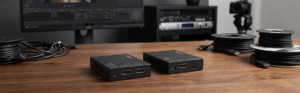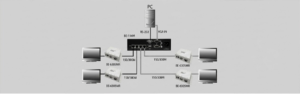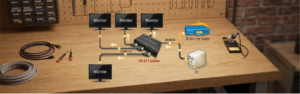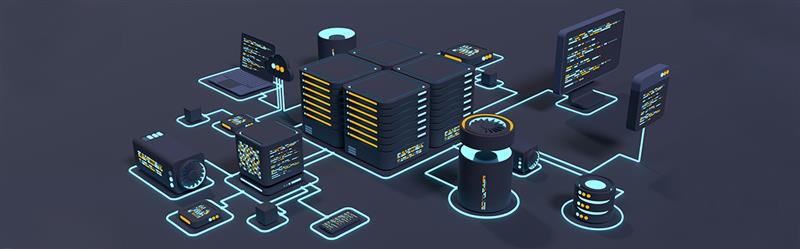
In this dynamic IT management realm, the new-era system admin can nowadays bid adieu to the needless onsite visit costs by installing KVM extenders. These advanced KVM switches bring prompt remote linkups via CAT5 cables, thus keeping the modern workstations completely uncluttered. Operating on IP-based technology, these KVM devices deliver signals extended from a server or PC over LAN, WAN, or TCP/IP connectivity. This further supports the admin to remotely track several PC endpoints anytime and from anywhere.
Beacon serves as the one-stop platform providing safe, trusted, and scalable network KVM software that aptly resolves the functions of a remotely located admin. Such state-of-the-art KVM switches help the business enterprises in gaining increased network extensibility. These extenders come with an ergonomic plug-and-play pure hardware design, which helps to never need to download any third-party application.
5 Foremost Significant Rationales to Consider Introducing the IP-Based KVM Extender Devices
1. Ergonomic Installation with Streamlined Configuration via DHCP
With the modern KVM switches, there is no requirement to replace them, as they can link up through the existing network configuration. Offering accelerated remote connectivity, these KVMs remove the glitches of network latency and the hassles of on-site visits for users. Such a network arrangement can be easily synced up with the controller software. This resultantly makes the network easier to add and scale up across the entire network matrix.
These extenders, functioning on the IP-based technology, help to promptly configure the specific matrix arrangement by using the built-in client/server linkup of the DHCP. This Dynamic Host Configuration Protocol server can be located anywhere throughout the network structure. This further helps the admin to automatically install the network or IP addresses.
2. Sustains Uniformity and Extensibility over Multiple Main and Sub-Networks
Now, these cutting-edge KVM switches support the system admin to swiftly link up to almost countless system endpoints. This connectivity further assists in integrating multiple devices and end-users under a central network arrangement. Besides, this helps to configure the routing or matrix switcher from the remote server positioned anywhere worldwide.
These IP-based KVMs can be quickly linked up to several networks and sub-networks. The admin can easily scale up the network configuration as per the increasing users, only by adding the number of transmitters and receivers. Likewise, the local backup IT expert can operate from a single and centrally-located server that aptly simplifies the entire network sequence.
3. Real-Time Data Transmittals with BIOS-Level Remote Access
Likewise, these KVM extender devices can efficiently streamline the remote accessibility to multiple PCs and servers over the component-level network infrastructure. Thus, by leveraging such advanced KVM automation, the remotely located system admin can support global workplaces with hassle-free real-time debugging tasks.
This results in curbing down the redundant expenses of on-site client location visits. Furthermore, such IP-centric network KVM software can swiftly broadcast HD-quality images and video feeds by utilizing a minimal data transfer rate with expedited responses. In addition, by introducing such ergonomic KVM devices, the coders and system admin can significantly save on their time, money, energy, and resources.
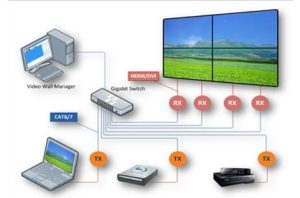
4. Simultaneous Live Remote Network Access to PCs, VMs, and Servers
Based on the existing IP framework, the KVM switchers can be effortlessly integrated to thoroughly track PCs and VMs via LAN or WAN. These extender devices bring remote linkups using the IP Gigabit Ethernet technology. This further helps the system admin to easily adjust to the virtual computing mode for remotely connecting to PCs, servers, and VMs.
These KVMs can easily digitize the incoming video signals and subsequently process them into digital content. This data is further transmitted to remotely positioned client PC or servers worldwide. Furthermore, the host or server PC assists multiple guest VMs by virtually switching the cache spaces while optimizing operations by reducing operational setbacks.
5. Increased Collaboration with Safety and Returns
Moreover, this KVM over IP helps in simpler collaboration by permitting multiple end-users to access and gain control over the same server concurrently. This is suitable for teams functioning on projects that need real-time interactions and coordinated endeavors. Such extender switches come with cutting-edge security features, including authentication protocols and encryption.
As a result, it heightens the data protection level and mitigates the risk of unlawful access. Now, the cost of a regular IP networking device is highly cost-effective, hence increasingly accessible than copyrighted systems. Thus, with its increasing scalability, multiple endpoints, and cost-effectiveness, business and IT enterprises can gain improved and quicker returns.
Parting Thoughts!
Beacon, the leading, trusted UTP-based IT hardware vendor, can be the best platform to introduce the modern network KVM software. Supported by 42 years of unmatched expertise, we provide highly scalable KVM extender switches. Such devices help the system admin with one-to-one (Unicast) and one-to-many (Multicast) IP configuration for real-time AV transmissions. These KVM devices are available fully featured with ergonomic plug-and-play features and pure hardware design. Using such KVMs, the admin can remotely troubleshoot PCs and servers throughout the existing global network arrangements.
FAQs
1. What type of cabling is used for network KVM?
IP-based KVM switches use regular network cabling of CAT5Ee/6 and use the prevailing network infrastructure.
2. Are network KVM solutions secure for remote access?
Now, the enterprise-level network KVM devices offer ultramodern security features for optimal practices.
3. Where are network KVM solutions typically used?
KVMs are extensively utilized in server rooms, labs, data hubs, control rooms, and enterprise IT environments needing centralized management and security.
4. Does a KVM switch affect performance or video resolution?
KVM extenders never impact the performance of linked-up PCs, and support high-end resolutions of 4K and 8K, delivering crystal-clear images and videos.
5. Can KVM be used with different operating systems?
KVM switches typically function as platform-independent and with discrete operating systems via dongles or interface modules.