Do you ever feel as if your eyes are doing a marathon across the chaotic arrangement of multiple desktops? We’ve all been there: juggling a separate PC for analysis, a media player that streams live video, an entire server feed, and maybe your security camera console? You waste precious desk space, swallow hefty hardware costs, and suffer from total wire chaos. What if you could take all those disparate inputs and fuse them into a singular, cohesive powerhouse display?
This is where an HDMI Multiviewer Monitor changes the game. The technology isn’t only an incremental upgrade. It is an absolute game-changer that completely shifts how we interact with incoming data feeds. So, let’s get to why this tech is taking the modern workspace by storm and if it is worth ponying up the cash or not.
The Problem with Traditional Multi-Screen Setups
Numerous businesses still cling to having several displays to keep track of various video resources. This works but involves some hurdles:
- Increased hardware costs
- More cabling and installation complexity
- Higher power consumption
- Limited desk or control-room space
- Difficulty managing multiple displays
Let’s face it: having a wall of monitors can quickly become a headache.
These problems are remedied by utilizing an HDMI Multiview Monitor, which combines multiple video entities into a single comprehensive view layout. This is a perfect case of working smart rather than hard.
Why HDMI Multiviewer Monitors Are a Game-Changer
1. Enhanced Situational Awareness
When every video source is displayed on a single screen, operators have immediate situational awareness of all the critical information.
An HDMI Multiviewer Monitor helps security personnel monitor multiple camera feeds simultaneously. Broadcast teams can oversee various production inputs without constantly changing screens. A Business can monitor from one screen presentations, data dashboards, and video conferences.
The neat thing about seeing everything at once is that it shortens reaction times and increases operational efficiency.
2. Space-Saving Design
In many environments, even desk space is at a premium.
An HDMI Multiviewer Monitor provides a clean workspace rather than cluttering workstations with multiple displays. An obvious advantage is the fewer displays, resulting in fewer cables and clutter, and easier to manage a system.
Sometimes less really is more.
3. Improved Productivity
Cyclical switching between inputs may sound trivial, but those minutes lost count over the day.
An HDMI Multiview Monitor eliminates unnecessary screen switching, allowing users to focus on what matters most. Staff will spend less time wading through displays and more time responding to information.
These productivity gains are substantial, particularly in high-tempo or mission-critical environments.
4. Flexible Viewing Layouts
Modern HDMI Multiviewer Monitor solutions offer various display configurations.
Users can choose:
- Quad-screen layouts
- Picture-in-picture modes
- Side-by-side viewing
- Custom display arrangements
Such flexibility gives organizations the ability to customize these viewing experiences as per their specific operational needs.
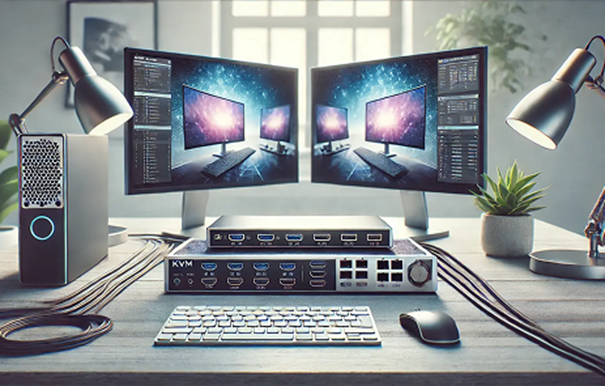
Where It Shines: Crucial Real-World Scenarios
A high-tier HDMI Multiview Monitor system excels wherever data concentration dictates success.
1. Command & Control Rooms
Security personnel and network operators monitor live camera grids alongside diagnostic telemetry dashboards simultaneously. Every millisecond counts, and having a unified view saves precious time when an anomaly occurs.
2. Media Production & Broadcasting
Directing a live stream? You can view the master program out, preview channels, and live social media telemetry side-by-side without cluttering your studio desk with five separate panels.
3. High-End Financial Trading
Traders can anchor their core execution window on one section of an HDMI Multiviewer Monitor while live news crawls and charts populate the remaining quadrants.
The Summary
Technology is advancing, and efficient video management has never been more crucial. Multiple HD media sources can be displayed on a single monitor when using an HDMI Multiviewer Monitor from The Beacon Link Inc. This makes it a practical option for organizations that want to monitor multiple screens without the headaches involved with conventional setups.
As you can see, the advantages are apparent from security centers and broadcast studios to commercial boardrooms and industrial control rooms. From greater visibility to improved productivity and ease of operations, the HDMI Multiview Monitor is a smart investment for tech-savvy businesses.
A screen that is capable of the work of several applications begs for an out-of-the-box solution.
FAQs
1. Can an HDMI Multiviewer Monitor display sources with different resolutions?
Yes. Latest hardware controllers ingest various input resolutions. This intelligently scales them to cleanly fit your chosen screen layout without distorting the image.
2. Is there any noticeable input lag when using a multiviewer controller?
High-end dedicated hardware processing ensures zero to negligible latency. This makes them perfectly suited for critical live monitoring, broadcast editing, and control room environments.
3. How do you control the audio coming from multiple HDMI sources?
Where multiple video feeds are displayed at once, the controller can be used to easily enable and select which single audio input is directed to your monitor speakers or audio out.
4. Can you change the size of the windows on the fly?
Absolutely. Most setups support customizable presets, letting you switch seamlessly from a standard 4-quadrant layout to a large primary window with smaller secondary feeds along the side.
5. Do you need special software to run this setup?
No. Pure hardware-based controllers function entirely plug-and-play. They process the video signals directly before sending them to the display. This eliminates the need to install background drivers on your computers.