With an industry that obsesses over the latest shiny new tech toys, it comes as no surprise that the flashiest new display standards are what make headlines in a corporate tech news world. USB-C and HDMI 2.1 are technologies that they shout from the rooftops about. However, if you were to step into the control room of a large transit center or broadcast studio, perhaps you would be surprised. A quiet veteran still anchors the architecture. A specific workhorse continues to dominate the racks: the unyielding, unshakeable DVI interface.
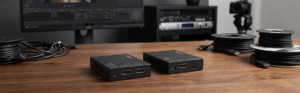
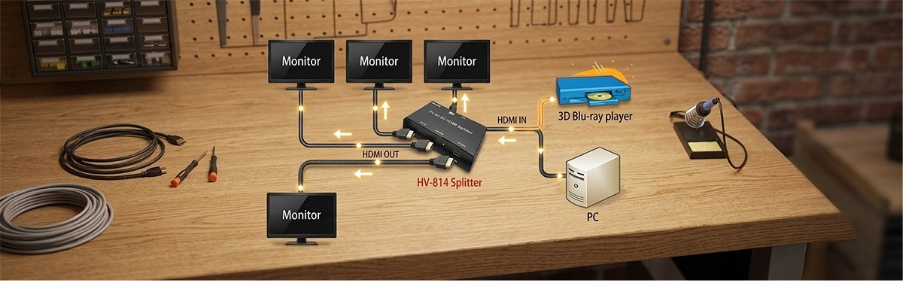
Many thought newer options would push older visual interfaces out to pasture years ago. They were wrong. Instead, modern enterprise setups still lean heavily on a rugged tool. They utilize the DVI Video Splitter to distribute crisp, uncompressed digital video across multiple screens simultaneously.
Let us look closely at five proven reasons why enterprises refuse to say goodbye to this reliable hardware. We will also explore how it solves the toughest real-world connectivity puzzles.
1. Mechanical Thumbscrews: A Rock-Solid Physical Lock
Have you ever had a crucial presentation drop its signal because a loose HDMI cable sagged in its port? In industrial settings, a loose cable means lost revenue or worse. The DVI Video Splitter eliminates this vulnerability through its physical design.
Unlike slick, modern connectors that rely on friction alone, DVI plugs feature dual mechanical thumbscrews. Once you hand-tighten those screws into the chassis of a high-quality DVI Video Splitter, that connection goes nowhere. It is also very resistant to heavy vibrations from industrial machinery, accidental tugs from cleaning crews, and structural movements. It locks down your signal completely. For critical server racks and medical monitoring setups, this physical reliability is worth its weight in gold.
2. Zero Signal Compression for Flawless Data Integrity
Modern display interfaces compress raw video data to cram high resolutions alongside multi-channel audio and network data into a single thin wire. Usually, that is fine. But when a radiologist reads a subtle chest X-ray or a security analyst monitors granular control panels, compression artifacts cause serious problems.
A DVI Video Splitter specifically for the job solves this problem by being dedicated to nothing other than raw, uncompressed video. It does not put itself forth as a jack-of-all-trades. A good Splitter avoids packetization and clones the incoming digital signal properly. It outputs identical, pixel-perfect replicas across every connected screen with zero compression artifacts and zero added latency.
3. Solving the HDCP Handshake Nightmare
If you’ve maintained AV arrangements, you’ll realize the torment of a High-bandwidth Digital Content Protection (HDCP) handshake error. It does not work with long chains because newer HDMI systems negotiate the copy protection keys incorrectly when passing them on and end up making every screen in the chain go black.
DVI handles this beautifully. A professional-grade DVI Video Splitter manages EDID (Extended Display Identification Data) and HDCP keys with incredible stability. The hardware learns the display parameters from your primary monitor and copies them seamlessly to all secondary outputs. This approach stops flickering and keeps your displays completely stable. It works every single time.
4. Avoiding the Massive Cost of Total System Upgrades
Replacing a complete video system is incredibly expensive. For businesses with sophisticated, medical-grade LCDs, industrial touchscreens, or high-performance workstations that use DVI ports, replacing entire expensive displays and servers just to make them compatible with a newer cable format doesn’t always add up.
Smart IT directors do not throw the baby out with the bathwater. Instead, they drop a robust DVI Video Splitter into the existing setup. This simple hardware addition allows businesses to extend the lifespan of their current assets by years. It maximizes their initial investment while delivering top-tier multi-screen distribution.
5. Perfect Adaptability in Mixed-Signal Environments
DVI occupies a unique sweet spot in display history because it bridges the digital and analog worlds perfectly. DVI-I ports carry both sharp digital signals and legacy analog VGA lines in the same connector.
This versatility gives a DVI Video Splitter incredible flexibility. With simple, inexpensive passive adapters, a single splitter can take an input signal and feed a new digital monitor alongside an older analog projector. It acts as an elite universal translator for your video signals, saving you from buying costly active conversion boxes.
To Conclude
Despite the rise of HDMI standards backed up by increased video quality, the DVI Video Splitter has and will continue to provide integral functionality since it effectively addresses actual business needs with demonstrated reliability, ease of setup, and superior image resolution. Instead of pursuing the next big thing, most organizations go with established solutions that provide tangible benefits day in and day out.
With trustworthy solutions from The Beacon Link Inc., you can build an AV system that performs consistently today and continues supporting your business well into the future. Don’t let unstable display connections disrupt your operations. Explore the highly reliable collection of professional distribution hardware at The Beacon Link Inc. Video Splitters and secure your infrastructure today!
FAQs
1. Does the Splitter support high-definition res?
Absolutely. Dual-link DVI configurations easily handle a resolution of 2560×1600 at 60Hz. They also support standard 1080p Full HD without breaking a sweat. It is another great option for sharp and detailed business displays.
2. Does using a DVI Video Splitter introduce any lag or latency to the extra screens?
No. High-quality hardware splitters use active amplifiers to clone the raw digital signal immediately. The hardware-level distribution guarantees that there is no lag, making it perfect for places like control rooms and real-time monitoring.
3. Can you convert a DVI splitter output to work with HDMI monitors?
Yes. The same underlying digital video signaling technology is in use by both DVI and HDMI. That means you can stick cheap DVI-to-HDMI adapters between your splitter and modern displays without losing fidelity in the video chain.
4. What is the difference between an active and a passive DVI splitter?
A passive splitter is a simple Y-cable that splits the electric signal in half. This degrades quality and forces you to use short distances. An active DVI Video Splitter connects to a power source, boosts the original signal, and sends pristine high-powered video to all displays over long distances.
5. Why should you purchase your video distribution hardware from The Beacon Link Inc.?
At The Beacon Link Inc., we design professional-grade video distribution tools built for continuous operation. Our robust hardware solutions offer pristine signal isolation, advanced EDID management, and industrial durability. They ensure your critical business displays stay up and running without a hitch.